Bun.sh - The Endgame for Node.js?
👋👋👋 Hey everyone! If you've stumbled upon this article, drop a comment to say hi and make it lively!
In this piece, we'll delve into a very fresh name, Bun - a new JavaScript Runtime that's been making waves for the past two years (2022 - 2023). Recently, it's even hotter than before, giving well-established competitors like Deno and Node.js a run for their money due to its impressive performance.

On 08/09, Bun officially rolled out its stable version 1.0.0, marking a significant milestone in its journey. When compared to Deno, I've observed that Bun holds immense promise for the future of web development using JavaScript & TypeScript, as it's capable of some pretty astonishing feats:
- Fully compatible with Node.js 🤗
- Lightning-fast processing speeds ⚡️
- Highly versatile
- Supports TypeScript, JSX/TSX
- Compatible with both ESM and Common JS syntax. No more wrangling with configurations like:
- babel, .babelrc, @babel/preset-*
- ts-node, ts-node-esm
- tsx
So, what's the big deal about Bun? And should we consider making the switch? Let's explore together! But before diving deep into Bun, let's first understand the concept of a JavaScript Runtime. 🤗
JavaScript Runtime
Looking back, JavaScript was initially crafted to interact with web browsers, allowing content modifications without reloading the entire page. As a result, it was designed as an interpreted language. The approach was straightforward; browsers would fetch the JavaScript code files and execute them. The benefits are undeniable as developers could swiftly integrate JavaScript into their websites. However, this meant that JavaScript couldn't run independently!
Over the past decade, as JavaScript's influence grew and there was a desire to push its boundaries beyond browsers, there emerged a need for something akin to a browser to execute it - enter JavaScript runtime. A JavaScript runtime is an environment that executes JavaScript code. It offers essential components such as: WebAPIs (DOM API, Canvas API, Fetch API...) for browser interactions, a JavaScript engine to compile JavaScript code into machine code (or interpret it, prior to the introduction of the JIT mechanism in 2008), memory allocation and management, the callback queue, and features that enable JavaScript to run outside of the browser, like on servers.
Introducing Bun v1.0
One of the primary reasons Bun was created was to make web development with JavaScript and TypeScript easier, while achieving high performance and ensuring that libraries and web frameworks run effectively.
It's undeniable that the JavaScript ecosystem can be complex. There are various tools and syntax types: common JS, ESM modules, TypeScript... Each one requires its own setup. Bun was introduced to eliminate this complexity. Now, js, ts, jsx, and tsx files can run directly with Bun without the need for any additional dependencies.
Up to this point, there are two well-known JavaScript runtimes:
- Node.js: uses the Google Chrome V8 engine, which is the engine used in Chromium browsers.
- Deno: also utilizes the V8 engine but offers additional TypeScript support, and is faster than Node.js.
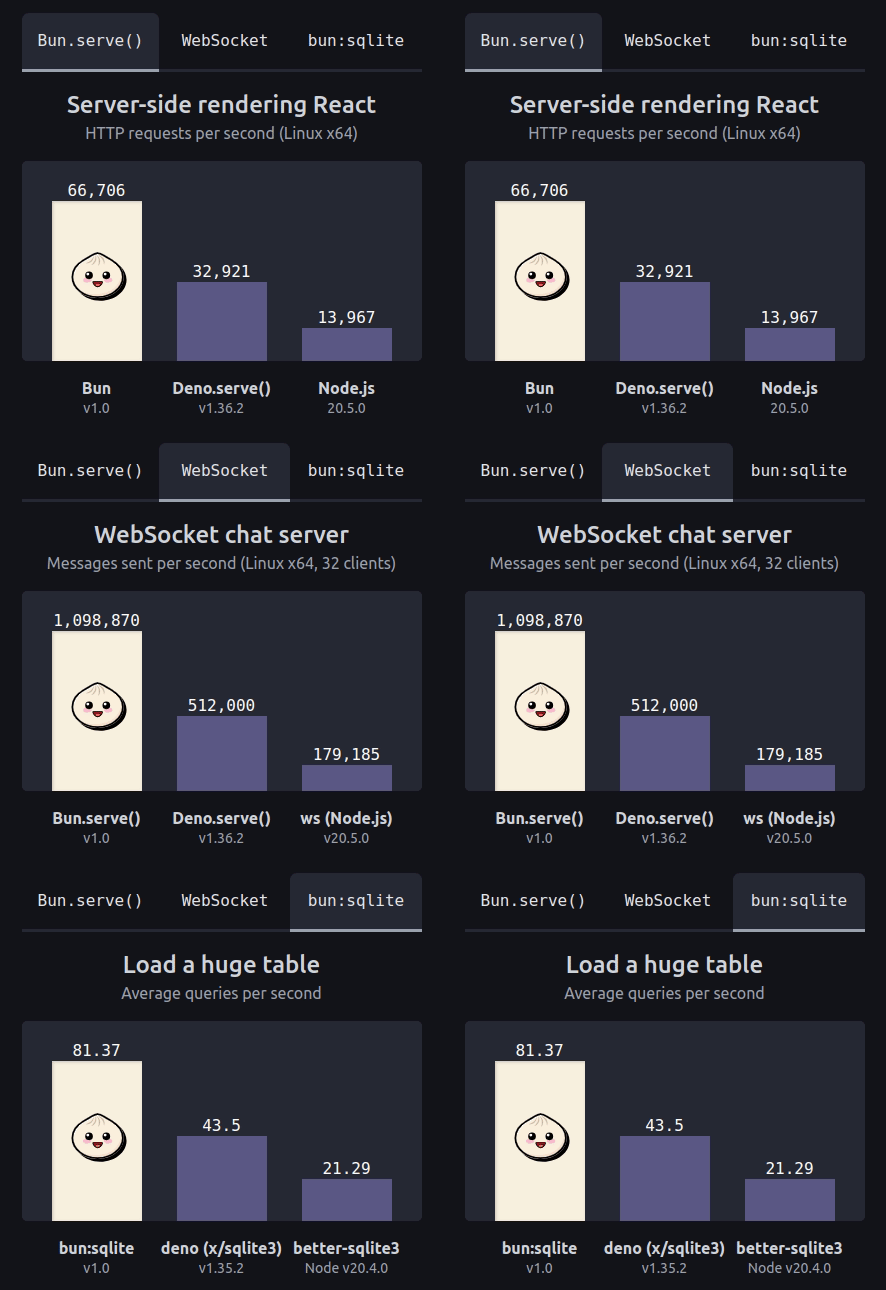
Now, we also have Bun, written in the Zig programming language and utilizing the WebKit engine, used in Apple's Safari browser. This engine is known for its fast start up and efficient memory usage. Bun promises substantial performance improvements over both Node.js and Deno. Below is a performance benchmark comparison between Bun v1.0, Deno, and Node.js. The results even exceed what was observed during Bun's beta testing. It surpassed all initial expectations.
Installing Bun
Installing Bun is incredibly easy and quick. Run the following command for installation on Linux, Mac, or WSL:
curl -fsSL https://bun.sh/install | bash
Upgrading
If you ever need to upgrade after installation, simply run the following built-in command:
bun upgrade

What else can Bun do?
All-in-one Toolkit
Bun isn't just a JavaScript runtime. It has evolved into an All-In-One toolkit, suitable for all stages: develop, test, run, and bundle for JavaScript and TypeScript applications:
- Bun serves as a package-manager, an alternative to NPM, Yarn, and PNPM. It's compatible with NPM, which means it still reads the current package.json files and uses node_modules. The difference is that Bun uses a bun.lockb file to log dependency installations. Plus, familiar commands from NPM like install and add also work with Bun. There's no need for additional packages like:
- npm, .npmrc, package-lock.json
- yarn, yarn.lock
- pnpm, pnpm.lock, pnpm-workspace.yaml
- lerna
- Bun also acts as a bundler, similar to Vite and Webpack. It's designed to be compatible with ESBuild and provides enhanced performance. It could potentially replace tools like:
- esbuild, webpack
- parcel, .parcelrc
- rollup, rollup.config.js
- Bun doubles as a test runner for applications, akin to Jest, and it's also Jest-compatible. It supports snapshot testing, mocking, and code coverage. This eliminates the need for dependencies such as:
- jest, jest.config.js
- ts-jest, @swc/jest, babel-jest
- jest-extended
- vitest, vitest.config.ts
- Lastly, Bun serves as a JavaScript runtime, replacing Node.js and Deno. As such, some tools will be rendered obsolete:
- node is replaced by bun
- npx is replaced by bunx - which is 5 times faster
- nodemon - not required since Bun already has a built-in watch mode
- dotenv, cross-env - also not needed as Bun can directly read from .env files
⚡️⚡️⚡️ Even with all these responsibilities, Bun consistently showcases superior speed!
Node.js Compatibility
A particularly crucial point is that Bun is designed to be compatible with Node.js. This means apps currently running on Node.js can smoothly transition to run on Bun. 😍😍😍
- Bun still provides global variables like
__dirname, process. - Bun uses the same
node_modulesas Node.js. - Supports modules available in Node.js.
dgram, http2, inspector, repl, and v8.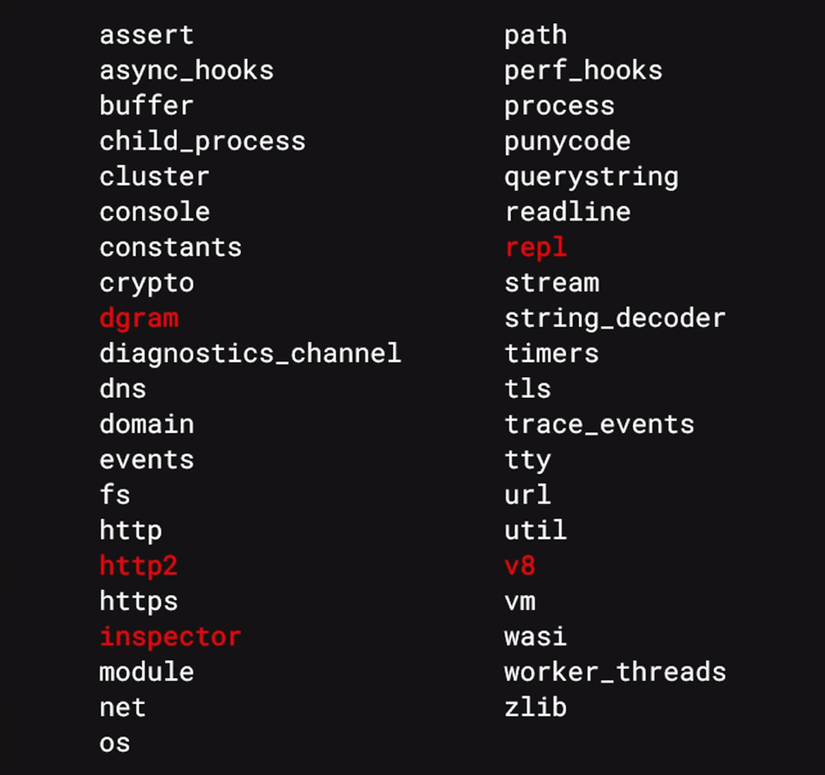
During its beta phase, Bun has been tested with popular backend and frontend frameworks like Express, Koa, Hono, Vue, React... and they all work fine on Bun.
Speed
In a small test with the program console.log('Welcome to Dev Success 101!'), I experimented to verify Bun's claims on its version 1.0 release day. Bun completed running the script in just 10ms, while Node took about 40ms. This means Bun is almost 4 times faster than Node, as per their claims. Impressive! 🤝
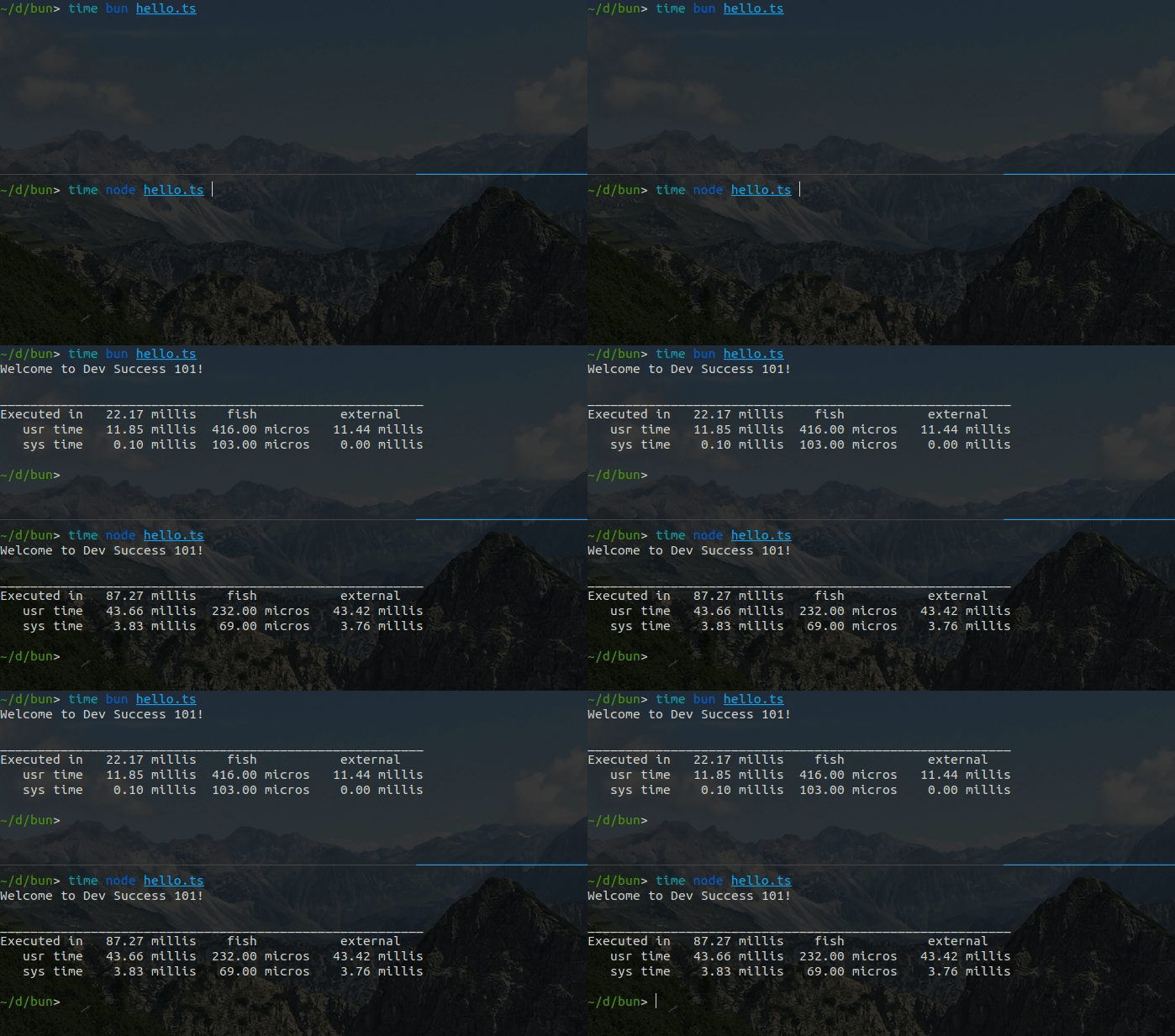
Below is the speed comparison from Bun when running the hello world script.
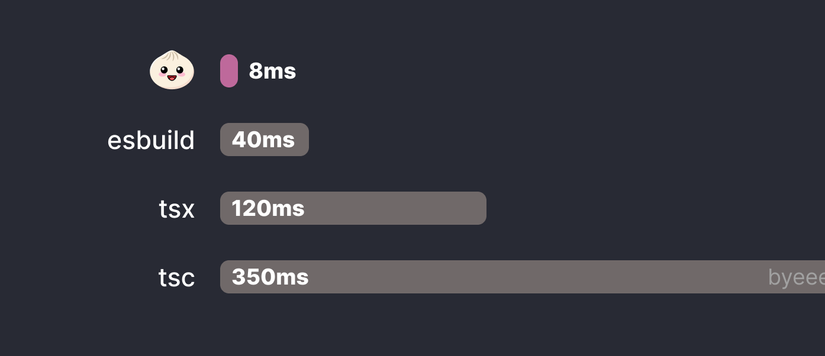
Support for TypeScript / JSX
As mentioned earlier, Bun can run JavaScript, TypeScript, and even JSX/TSX without the need for any additional dependencies:
bun index.js
bun index.ts
bun index.jsx
bun index.tsx
Support for ESM & CommonJS
Bun supports both ESM and CommonJS, so we don't have to worry about .cjs, .mjs files, or adding "type": "module" to the package.json like in Node.js. All the syntax from these files can be used interchangeably. Meaning, within the same file, you can use both import and require simultaneously.
import lodash from "lodash";
const _ = require("underscore");
WebAPIs
Bun itself supports the Web APIs currently available on browsers like: fetch, Request, Response, WebSocket, and ReadableStream. These built-in Web APIs are implemented in Bun as native-code and not javascript-code, so they're faster and more reliable. Hence, there's no need to add packages like node-fetch and ws anymore:
const response = await fetch("https://example.com/");
const text = await response.text();
Hot Reloading
Bun supports hot-reloading by adding the --hot option. For instance:
bun --hot server.ts
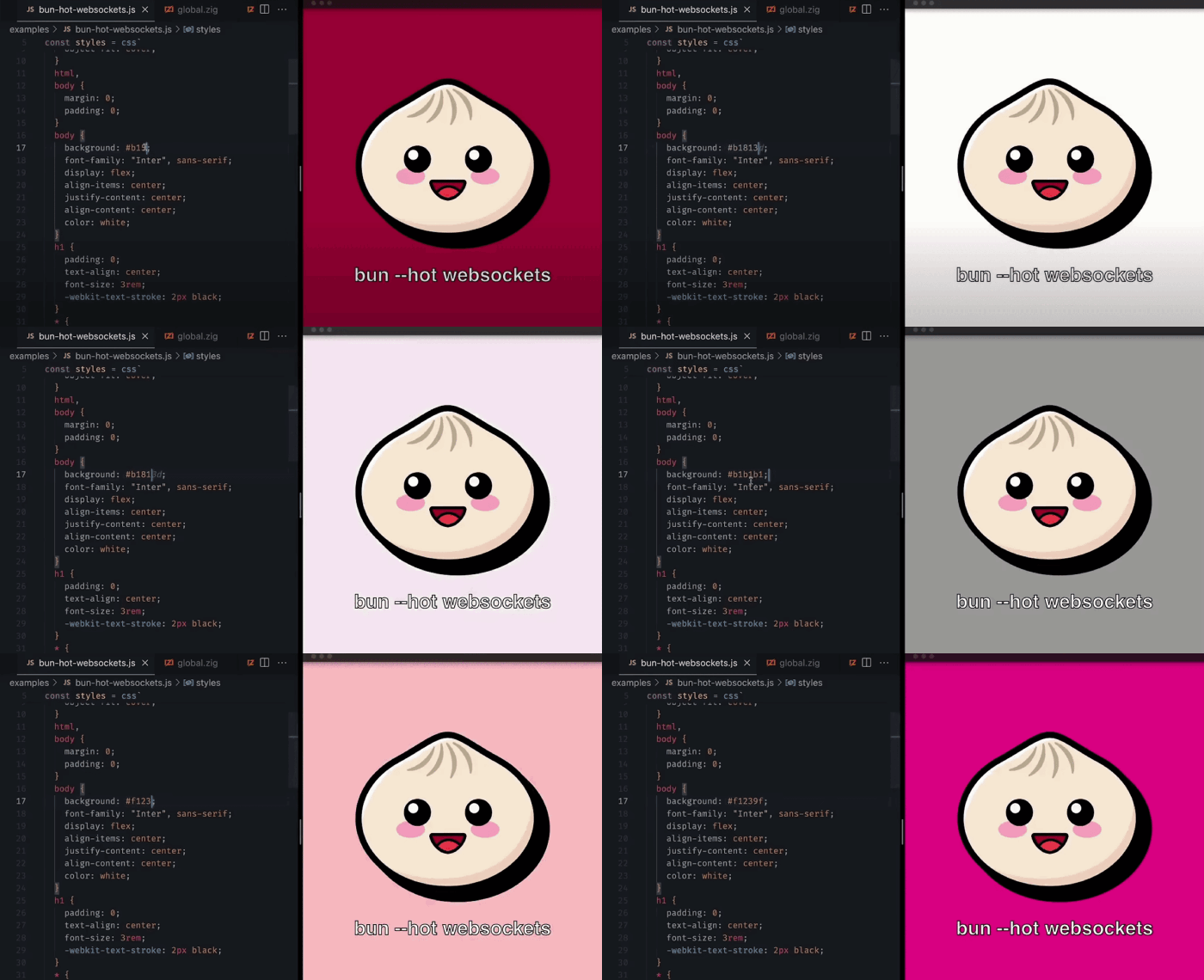
What makes Bun stand out compared to similar features in nodemon is that it performs hot reloads without shutting down the old process. This ensures that HTTP and WebSocket connections don't get disconnected or lose state during testing. 😍😍😍
Plugins
bundleryamlpng
import { plugin } from "bun";

plugin({
  name: "YAML",
  async setup(build) {
    const { load } = await import("js-yaml");
    const { readFileSync } = await import("fs");
    build.onLoad({ filter: /.(yaml|yml)$/ }, (args) => {
      const text = readFileSync(args.path, "utf8");
      const exports = load(text) as Record<string, any>;
      return { exports, loader: "object" };
    });
  },
});
Bun APIs
Bun .file ()
BunFileFile
const file = Bun.file("package.json");
const contents = await file.text();
const file = Bun.file("package.json");

await file.text();          // '{ "name":"demo" }'
await file.arrayBuffer();   // ArrayBuffer(2)
await file.blob();          // Blob
await file.stream();        // ReadableStream
await file.json();          // { name: "demo" }
Bun .write ()
Bun.write()
await Bun.write("index.html", "<html/>");
await Bun.write("index.html", Buffer.from("<html/>"));
await Bun.write("index.html", Bun.file("homepage.html"));
await Bun.write("index.html", await fetch("https://example.com/"));
Bun .serve ()
Bun.serve():
Bun.serve({
  port: 3000,
  // HTTP handler
  fetch(request) {
    return new Response("Hello from Bun!");
  },
  // WebSocket handler
  websocket: {
    open(ws) { ... },
    message(ws, data) { ... },
    close(ws, code, reason) { ... },
  }
});
Bun.serve()can handle a higher number of HTTP requests per second ,more than 4times compared to Node .js .Bun.serve()can handle a greater number of WebSocket messages per second ,over 5tim e sthat of Node .js . "
bun:sqlite
Bun offers an intriguing built-in API that supports SQLite. This API is similar to better-sqlite3. Moreover, it's written in native code, making it four times faster than using better-sqlite3 on Node.js.
import { Database } from "bun:sqlite";

const db = new Database(":memory:");
const query = db.query("select 'Bread' as framework;");
query.get(); // => { framework: "Bread" }
Bun.password
Bun.password is an API used for hashing and verifying passwords using the robust hashing algorithms bcrypt and argon2.
const password = "ultra-secure-pa$$phrase";
const hash = await Bun.password.hash(password);
// => $argon2id$v=19$m=65536,t=2,p=1$tFq+9AVr1bfPxQdh...

const isMatch = await Bun.password.verify(password, hash);
// => true
bun:test
This is the built-in test runner provided by Bun.
import { test, expect } from "bun:test";

test("2 + 2", () => {
  expect(2 + 2).toBe(4);
});
bun test
As mentioned, it's compatible with Jest. So, if you're writing test cases with Jest, migration should be smooth since imports from @jest/globals will automatically map to bun:test.
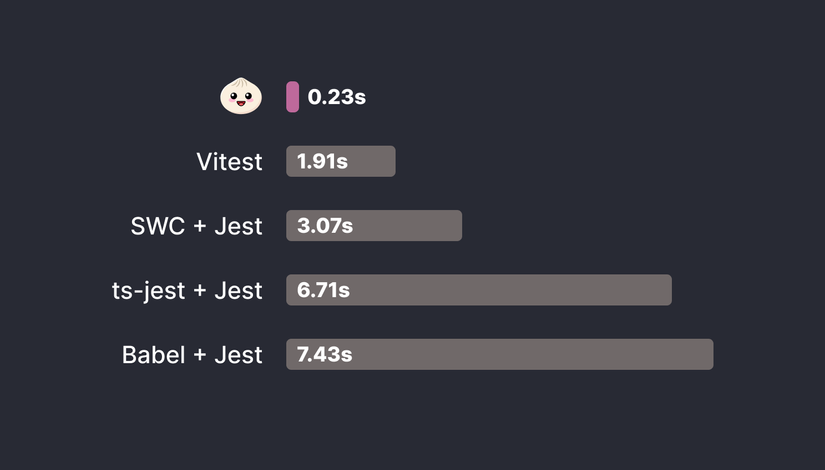
When running tests, Bun offers faster performance:
- 13 times faster than Jest
- 8 times quicker than Vitest
- Notably, the
expect().toEqual()function in Bun operates 100 times faster than Jest and 10 times speedier than Vitest.
Is Node.js Dying?
After trying out the beta versions and experiencing the impressive performance of Bun, I have a high regard for it. I can see its potential for production usage as an alternative to Node.js for performance improvement.
However, there are some reservations:
- Node.js is deeply rooted in the modern web development market. It's challenging to persuade everyone to switch to Bun immediately. No one wants to leave a stable service in production to use something that just released its version 1.0.
- Bun has just released its first production-ready version 1.0. The majority will need time to monitor its stability. There have been some detected issues with Bun that are currently being addressed.
- Although touted as compatible with Node.js, not all of Node's APIs are supported. Some Node.js modules might not be implemented in Bun, meaning some Node.js projects can't immediately switch to Bun.
- Not all market frameworks/tools run smoothly with Bun. I'm a fan of Cloudflares, and some things like Cloudflare Pages/Workers that I set up with Bun aren't yet fully operational. There could be other tools facing the same issues.
- The job market isn't actively looking for Bun expertise yet, which may limit its adoption among developers.

So, which projects might use Bun?
I believe Bun can be used for small services for experimental purposes right now. It's undeniable that Bun has achieved so much in such a short time. It's impressively fast!
Conclusion
These are the latest updates on Bun that I wanted to share with everyone. Some opinions in the article are my personal biases. What do you think about Bun? Let's discuss in the comments below!


0 Comments