
Introduction
Hey everyone, welcome back to my blog 😄 😄.
In this post, I'll share some of the techniques I've used to improve my JavaScript coding, things I've learned and found effective in practice.
If you enjoy this read, give me a thumbs up and let's dive right in!
Which Editor to Use?
There are countless editors out there for programming, which can be overwhelming for beginners, wondering which one maximizes productivity.
Aside from mandatory tools like Android Studio for Android coding or Xcode for iOS, I mostly use Visual Studio Code.
Developed by Microsoft - and you know it's got to be good when Microsoft is behind it. Indeed, it's impressive, supporting almost all languages, countless extensions for everyone, AI code suggestions, beautiful interface, and it's lightweight compared to other software 😄.
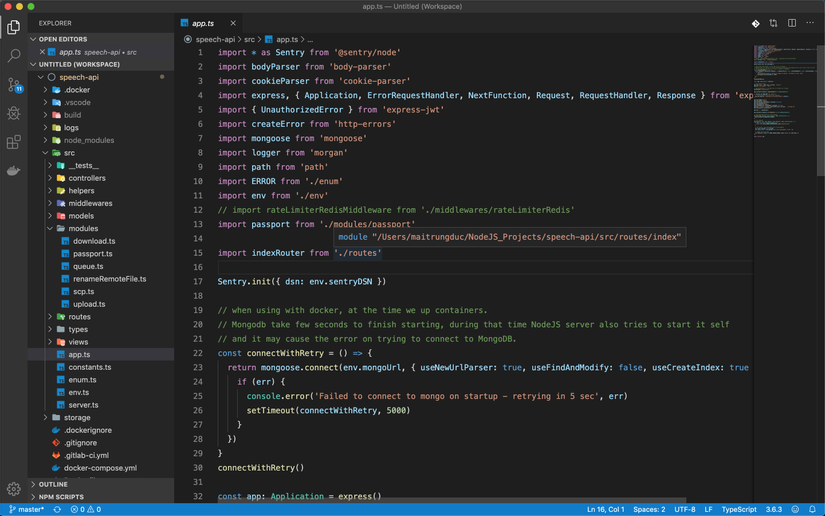
I once exclusively used Sublime Text (before VSCode became popular). My friend recommended switching to VSCode, and when I finally did, it was absolutely fantastic. Coupled with plugins (which I'll discuss below), it can automatically detect and fix errors and format the code. It has saved me so much time from fixing those frequent, minor coding mistakes.
Some may prefer PHPStorm for PHP, or PyCharm for Python. While those are strong editors for specific languages, as a Fullstack developer working with JavaScript, HTML, PHP, NodeJS, React, Docker, etc., I lean towards VSCode for its immense power and especially its intelligent autocomplete feature ❤️.
Fall in Love with ESLint
One of the biggest time-wasters and annoyances for me are syntax errors, undeclared variables/functions, missing punctuation, and so on. As our code grows, our eyes tire from reading dozens of files, our minds whirl, and shaky hands type out each line, leading us to overlook and make errors 😄.
That's why I use ESLint, a plugin that helps detect errors, check syntax, format code, and reduces bugs. It also beautifies the code following popular global standards. ESLint supports big players: pure JavaScript, React, Vue, and more.
Pairing ESLint with VSCode is a match made in heaven 😄. As you type, it checks for errors/syntax and offers immediate suggestions on optimal function and variable usage. Plus, it auto-formats the code – just hearing about it makes one fall in love ❤️.
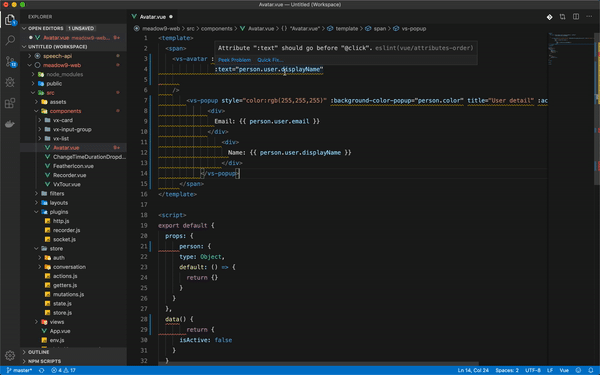
Since incorporating ESLint, I've drastically reduced those annoying, common errors. Before, sometimes I'd code -> build -> run and get a variable error, then edit -> build -> run and get a function error. It was so frustrating. But I've long said goodbye to those days 😄, and my coding is way more productive.
While Prettier is also used for code formatting, I prefer ESLint as it offers error detection and coding optimization suggestions.
Optimize Folder Structure
A recent realization and self-reminder for me is:
Don't obsess over perfecting project structure from the get-go.
But wait, if we don't structure the project well, will it collapse later on? 😄
Not too long ago (just a few months back), every time I started a project, regardless of its size, I'd spend loads of time trying to determine the optimal structure. I'd search online for "NodeJS folder structure best practices" and remain undecided, pondering whether this was truly optimal, or if I should choose a certain framework, wasting so much time.
And I noticed, even when I tried to follow a "good" structure initially, within days, my code would devolve into chaos 😄. Early on, regardless of how organized things looked, they'd inevitably end up in a mess 💥.
Don't overthink the initial architecture or organization. Choose a direction, a library, or a framework and get to work. As you go, refine and improve to best fit the reality.
I'm only touching on this briefly now, with more to come 😄.
However, for those interested in well-structured projects, I'd recommend the NodeJS framework called NestJS. I've read much of their documentation and find their architectural approach very impressive (quite similar to AngularJS, though I'm not a big fan of Angular 😄).
Use console.log wherever something seems off
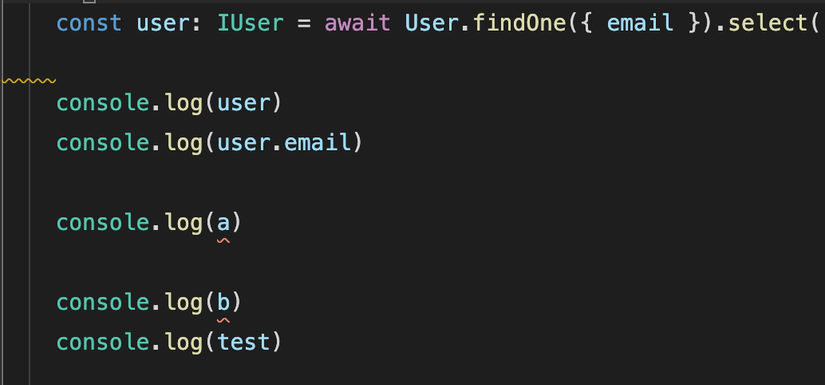
When coding in JavaScript, I often find myself using console.log more than anything else. The main purpose is to check if the data where I'm focusing is correct.
I've had people ask me, "Why isn't my code running?" or "Why is the data incorrect?" When I ask if they've used console.log, they often don't know where to look or say they haven't seen any issues in the console. But when I ask them to screenshot their Chrome console tab, it's filled with errors! 😂😂
Personally, I believe that regardless of the programming language, most tasks revolve around data. So, if you're ever unsure about any piece of code, just use console.log to double-check.
Some folks argue that using the debugger is more professional and advanced, noting that Chrome also supports setting up Debug lines for more insights. While this can be useful, I personally feel that console.log is sufficient. It quickly shows which line in the code has the issue, and even major tech companies like Google and Facebook use console.log a lot! 😄
However, a word of caution: once you're done with console.log and everything seems okay, remember to remove them. Don't push code filled with random console.logs to Git or show it to others—it can be quite frustrating and hard on the eyes for them! 😄
Comment wisely
During coding, there will be times when we write long, complex code and worry that we might not understand it in the future. Or, out of courtesy, we want the next person who reads the code to understand its purpose.
In my experience, commenting is genuinely useful, especially in team projects. You can't always reach out to the original coder for clarification, especially if they're busy fixing bugs. Well-explained comments can save a lot of time for everyone involved.
But remember, your comments should be sensible and concise. There's no need to comment on everything; overdoing it can make your code hard to read and can be another cause for sore eyes! 😄
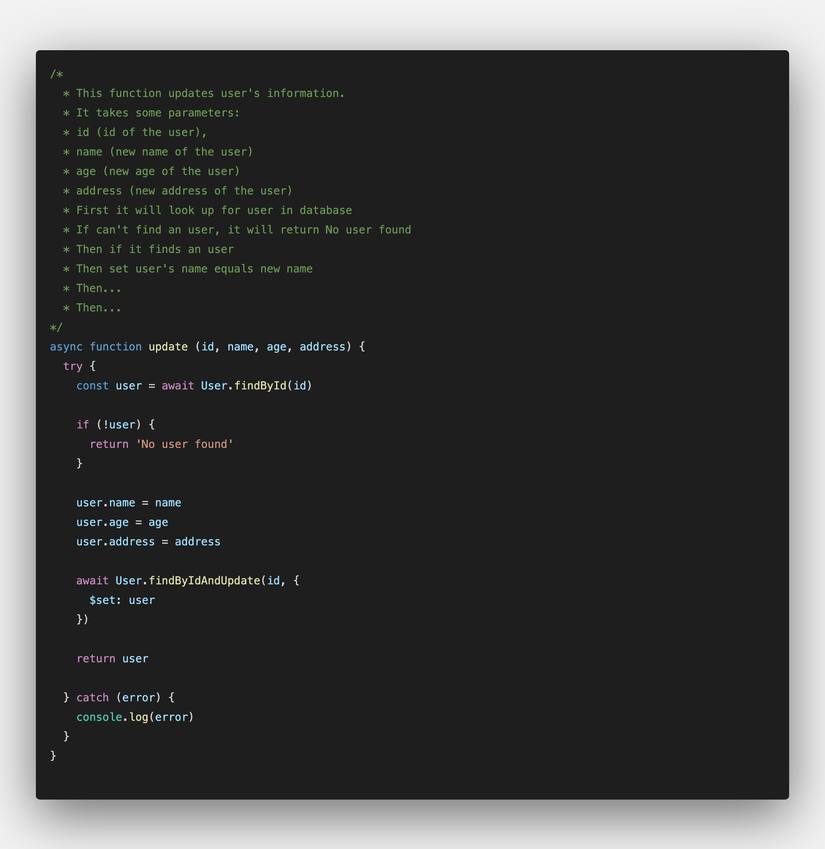
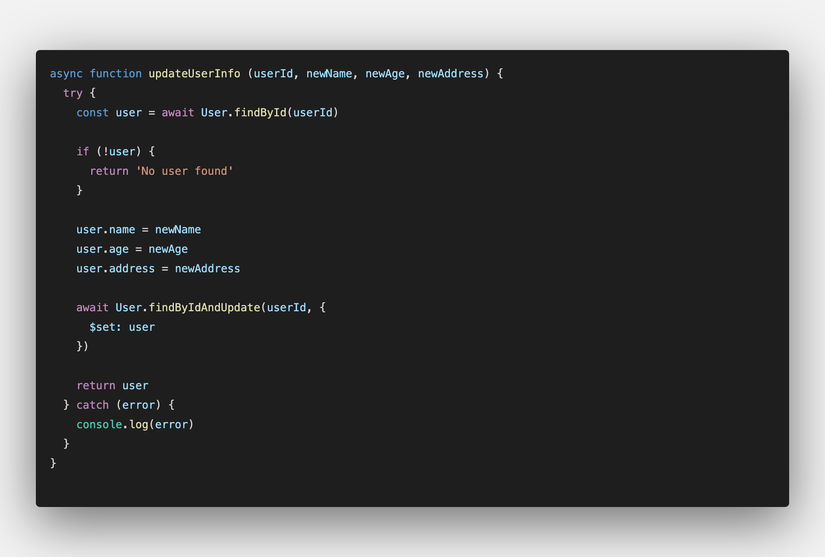
When I write code, I typically choose variable/function names that are self-explanatory, and I avoid making a class/function too long or complex. Instead, I'll break it down into smaller, more manageable parts. I'll only comment when truly necessary—try to write self-explanatory code, so just by reading, one knows its purpose.
For instance, instead of a long-winded comment, the code below is self-explanatory:
Embrace standards like ES6,7,8,9
JavaScript is a rapidly evolving language, continuously bolstered by powerful functions and libraries. As I understand, every year there's a new standard of JavaScript, called ECMAScript (or ES for short), and each standard introduces a range of new features integrated into JavaScript.
| Year | Standard |
|---|---|
| 2015 | ECMAScript 6 (ES6) |
| 2016 | ECMAScript 7 (ES7) |
| 2017 | ECMAScript 8 (ES8) |
| 2018 | ECMAScript 9 (ES9) |
| 2019 | ECMAScript 10 (ES10) |
| 2020 | Probably more to come 😄 |
So, by leveraging the latest and greatest in JavaScript, our code can look cleaner, be more efficient, and be more aesthetically pleasing than just sticking to traditional for loops, if statements, and while loops 😄
Below are a few examples of functions/operators I frequently use:
// Loop through an array using forEach
arr.forEach((item, index) => {
    // TODO
})

// Loop through an array using for...of (especially if there's asynchronous processing inside)
for (const item of arr) {
    await something()
}

// Create a new array from an old one (without modifying the original one, often used in React)
// For instance: create a new array with elements doubled from the original array
const arr = [1,2,3]
const newArray = arr.map(item => item * 2)
console.log(newArray)

// Filter an array based on a condition
const arr = [1,2,3,1]
const newArray = arr.filter(item => {
    if (item === 1) { return item }
})
console.log(newArray)

// Concatenate arrays
const arr1 = [1,2,3]
const arr2 = [4,5,6]
const arr3 = [...arr1, ...arr2]
console.log(arr3)

// Extract a property from an object
const { email, address } = user
console.log(email, address)

// Clone an object/array (widely used in React)
const obj = { name: 'my name' }
const clone = { ...obj }
console.log(obj === clone)
There are always new updates every time a new JavaScript standard is released. Using them flexibly can make our code look much cleaner and easier to understand.
Ditch Promises/Callbacks and Switch to Async/Await Today
The Downside of Promises/Callbacks
I've separated this section from the previous one because I've noticed many developers still rely on Promises and callbacks. Sometimes, when they share their code snippets with me, it's overwhelming right from the start. Here's the thing...
When coding, we often interact with APIs, whether they're from the backend or third-party sources. Typically, we'd do something like this:
// fetch a list of users
axios.get('/users')
.then(response => {
    console.log(response)
})
.catch(error => {
    console.log(error)
})
If we wanted to call another API only after successfully retrieving the user list, it usually goes like this:
// fetch a list of users
axios.get('/users')
.then(response => {
    console.log(response)

    axios.get('/locations') // fetch address list
    .then(response1 => {
        console.log(response1)
    })
    .catch(error1 => {
        console.log(error1)
    })
})
.catch(error => {
    console.log(error)
})
Things get messy when we want to call multiple APIs in sequence. This becomes apparent when a project grows, and the requests become more complex.
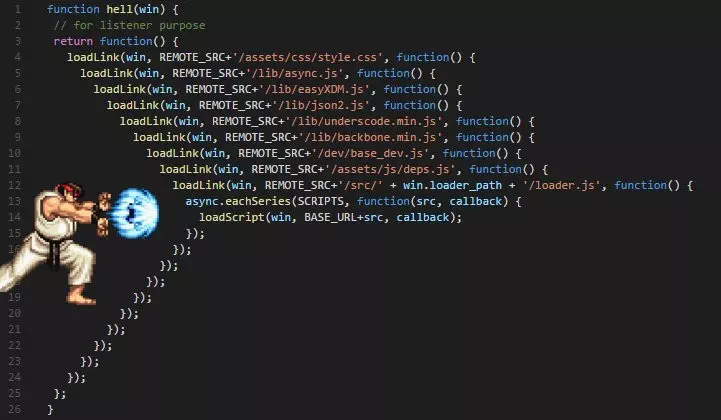
The same confusion occurs when relying on callback functions (you can't escape it!). The nested execution leads to confusion. It's overwhelming for the person who wrote the code, and even more so for anyone who comes after.
How Async/Await Saves the Day
Starting with ES6 (2015), async/await was introduced as an alternative to Promises and callbacks for handling asynchronous operations. The beauty of async/await is that it lets us write asynchronous code that looks synchronous. It runs line by line, making it easier to read and clean.
Using the above example of fetching users and their addresses, here's how it looks with async/await:
async function demo() {
    try {
        const users = await axios.get('/users')

        const locations = await axios.get('/locations')
    } catch (error) {
        console.log(error)
    }
}

demo()
Cool, right? The code looks synchronized, and it runs in the sequence we desire.
API calls like axios.get('/users') or axios.get('/locations') return a Promise (an asynchronous operation where the result isn't immediately available). By prefixing a Promise with await, the code execution pauses until the Promise is resolved. This makes handling asynchronous requests simpler and more intuitive.
For multiple asynchronous operations, just await all of them!
However, keep in mind:
awaitalways comes withasync.- Use
try/catchto handle errors insideasync functions. - Since
awaitpauses code execution until the Promise is resolved, overusing it can slow down your app.
I was hesitant about adopting this new approach, but now I rarely return to using Promises.
Another benefit of using async/await over traditional Promises and callbacks is that try/catch not only catches errors from async/await but all errors within the try block. Check out this quick example:
// Using Promises
axios.get('/users')
.then(response => {
    console.log(response)

    console.log(test) // `test` isn't declared, but Promises won't catch this error
})
.catch(error => {
    console.log(error) // won't log the `test` variable error
})

// Using `async/await`
async function demo() {
    try {
        const users = await axios.get('/users')

        const locations = await axios.get('/locations')

        console.log(test) // `test` isn't declared
    } catch (error) {
        console.log(error) // logs "test is undefined..."
    }
}
This simple example shows the power of try/catch. Imagine a long code: debugging would be a nightmare with Promises. But with try/catch, all errors within the block are caught. Isn't that loveable?
"What if my code is full of Promises and callbacks? Can I switch to async/await?" "My code's a mess. Are you sure I can switch from Promises/callbacks to async/await?" The answer is: you can always transition from traditional asynchronous forms (Promises, Callbacks, or even asynchronous event emitters) to async/await.
Here are some scenarios I've encountered when transitioning from Promises and callbacks to async/await:
//-----------FROM Promise TO async/await
// Before
function fetchUsers(){
    axios.get('/users')
    .then(response => {
        console.log(response.data.user)
    })
    .catch(error => {
        console.log(error)
    })
}

// After
async function fetchUsers(){
    try {
        const users = await axios.get('/users')
    } catch (error) {
        console.log(error)
    }
}
//-----------END FROM Promise TO async/await

//-----------FROM Callback TO async/await
// Before
getUsers((error, response) => {
    if (error) { throw error }
    console.log(response)
})

// After
const util = require('util')
getUsersPromise = util.promisify(getUsers) // convert callback to promise

async function fetchUsersAsync(){
    try {
        const users = await getUsers()
    } catch (error) {
        console.log(error)
    }
}

//-----------END FROM Callback TO async/await
Switching to async/await seems straightforward, doesn't it? 😉 The key is to have clean, maintainable code that doesn't strain our eyes when we revisit it 😄 😄. Basically, you only need to transform asynchronous processes like Promise, callback, or events to a Promise, and then you can use await (of course, if it's already a Promise, just go ahead and use async/await).
Note: Nothing's perfect in this world, and the same goes for async/await 😄. In some cases, you might still need to rely on Promise/callback. But overall, I believe async/await addresses many challenges, offering more advantages than drawbacks.
Enhancing Code Quality with Typescript
How it all started...
When I began programming, I started with C, then Java. They're powerful languages that require strict code conventions. You had to be clear about data types (string, boolean, etc.) and access specifiers (public, private, protected, etc.). I often felt overwhelmed not knowing whether a variable was public or private or its data type. It was trial and error until an error occurred 😂😂.
Later, transitioning to Javascript (or PHP, Python), it became much simpler since there's no need to specify data types. You can just declare a variable:
let x = 1

const test = 'A simple test'

const arr = [1, 2, 3, 4, 5]
This freedom in syntax was one of the reasons I fell in love with JS early on. But life's not always a bed of roses. As the project grows, or when revisiting old code, it becomes confusing without knowing the variable types or function return types.
const var1 = db.newColumn1
const var2 = db.newColumn2
const var3 = db.newColumn3
const var4 = db.newColumn4
Eventually, you find yourself doing this:
const var1 = db.newColumn1
console.log(var1) // -> string
const var2 = db.newColumn2
console.log(var2) // -> boolean
const var3 = db.newColumn3
console.log(var3) // -> number
const var4 = db.newColumn4
console.log(var4) // -> array
This can be time-consuming, and there's no guarantee that you or someone else will understand the code later without adding numerous console.log statements.
Typescript to the Rescue
While exploring blogs on Medium, Hackernoon, and wandering around Google, I stumbled upon Typescript.
To put it simply, Typescript is an "upgraded" version of Javascript. Your Javascript now can have clearly defined types (string, boolean, number, etc.), access specifiers, and much more. Typescript code compiles down to vanilla Javascript, so you run it as usual without needing any special runtime. Here's a quick example:
class Student {
    fullName: string;
    constructor(public firstName: string, public middleInitial: string, public lastName: string) {
        this.fullName = firstName + " " + middleInitial + " " + lastName;
    }
}

interface Person {
    firstName: string;
    lastName: string;
}

function greeter(person: Person) {
    return "Hello, " + person.firstName + " " + person.lastName;
}

let user = new Student("Jane", "M.", "User");
By adopting Typescript, code readability and understanding improve significantly.
Are you joking? After transitioning from C -> Java -> ... -> Javascript, you're complicating things with these data types. It looks like we're moving backward, right? 😂😂
Why write lengthy verbose code? I'm fine with console.log.
I heard about Typescript about two years ago but resisted using it, charmed by Javascript's flexibility. But later, considering the challenges I mentioned and the community's positive shift toward Typescript, I gave it a shot. Indeed, the initial switch was slightly challenging, but Typescript turned out to be user-friendly, being just an "enhancement" of Javascript. Transitioning code from Javascript to Typescript is easy, and you can even retain parts of the Javascript if you don't want to convert.
Now, whenever I revisit my code, it's easier to understand variables, functions, and more, saving a lot of time and reducing redundant operations, like constantly using console.log.
Currently, Typescript seems to be trending among Javascript developers. New libraries and frameworks are ensuring support for Typescript. Even Vue 3 has been rewritten entirely in Typescript 😉. Plus, with Microsoft backing Typescript, you can expect top-notch quality and support.
Back in the day, seeing job postings with good salaries demanding knowledge of Typescript/Flow* often made me feel underqualified. But now, being familiar with Typescript, I'm not intimidated by such job descriptions, especially as they're on the rise. Large projects with more developers truly highlight the benefits of Typescript. Even on my smaller projects, I've mostly transitioned
CI/CD - Code -> Test -> Deploy
I know some of you might find the topic a bit sleepy just by reading the headline, but I sincerely hope you'll continue reading. This has been trending in recent years.
Automation Test
Honestly, this is an age-old issue we all know about, yet many still neglect it, focusing only on writing massive and impressive code. 😄
Here are a few points before we move on:
- Sometimes we're so engrossed in coding that we forget about testing. As a result, when we deploy, we face many errors. Some might be minor and easy to fix, but major ones can lead to data inconsistencies and inaccurate system processing.
- We often assume our code covers all potential error scenarios, so we get complacent and skip testing, leading to the aforementioned consequences.
- Due to this overconfidence, even if we do test, we might not do it thoroughly, ending up in arguments with the testing team over the code's errors, even though we "tested everything." 😂😂
So, from now on, let's cultivate a habit. After completing a task or set of tasks during development, rigorously test, trying to cover as many basic scenarios as possible. Before committing, run tests and ensure they pass—after all, tests are fully automated; we just define them once. 😉
CI/CD - Continuous Testing and Deployment
CI/CD, which stands for Continuous Integration and Continuous Deployment, is a current trend. It's a new approach to coding, testing, and deploying seamlessly and automatically.

Previously, after coding, we'd test and only then, if everything looked great, commit the code to the repository. This is despite having automated tests set up locally.
- But what happens if someone pushes their code to the shared repository without testing? Others would need to review and ensure everything is okay.
- If, for some reason, a developer unintentionally deletes a few test cases but runs the remaining tests and thinks all is good, then commits the code. It becomes a shocker when testers come in and encounter a sea of red errors on Chrome's console. 😡😡
- Particularly for projects with many participants or libraries/frameworks with hundreds or thousands of contributors, you can't always trust every developer's testing skills. Some might haphazardly test and commit error-filled code, wasting time in the review process. 😃😃
That's why tools for automatic code testing, building, and deploying were introduced. These tools are typically integrated with the code repository. We define testing scenarios, build steps, and deployment processes, and then every commit by a developer is automatically checked against these criteria. If everything checks out, the code gets merged, built, and deployed live. This process is known as CI/CD.
This method saves a lot of time, reduces redundancy, and allows faster deployment to production.
So, how to get started?
- First, consider learning more about Docker.
- Write automated tests for your project (of course, we need tests! 😂😂).
- Look for platforms that provide CI/CD services. I often use Gitlab because it's free, private, and offers more powerful CI/CD tools compared to others like circleci and travisci, from what I've seen. 😄
- Learn and configure tests (unit tests, API tests, coverage tests, etc.) and set up automatic building and deployment.
Conclusion
I hope this article conveys some of what I've learned, guiding you to enhance your JavaScript coding skills and boost your potential. This way, you can seize new opportunities and deliver higher quality products. 😃
JavaScript is a rapidly evolving and robust language (capable of building nearly all types of applications across platforms I'm familiar with). So, continuous learning and updates can help us reduce development time, increase efficiency and quality, and, let's face it, lessen those eyestrain episodes. 😂😂
Thank you for following my blog. If you find any inaccuracies or have valuable insights, remember to comment below and share with everyone. ❤️


0 Comments